README
Appendix C - Quick overview of Agentic Frameworks
LangChain
LangChain is a framework for developing applications powered by LLMs. Its core strength lies in its LangChain Expression Language (LCEL), which allows you to "pipe" components together into a chain. This creates a clear, linear sequence where the output of one step becomes the input for the next. It's built for workflows that are Directed Acyclic Graphs (DAGs), meaning the process flows in one direction without loops.
Use it for:
Simple RAG: Retrieve a document, create a prompt, get an answer from an LLM.
Summarization: Take user text, feed it to a summarization prompt, and return the output.
Extraction: Extract structured data (like JSON) from a block of text.
Python
A simple LCEL chain conceptually
# (This is not runnable code, just illustrates the flow)
chain = prompt | model | output_scan
LangGraph
LangGraph is a library built on top of LangChain to handle more advanced agentic systems. It allows you to define your workflow as a graph with nodes (functions or LCEL chains) and edges (conditional logic). Its main advantage is the ability to create cycles, allowing the application to loop, retry, or call tools in a flexible order until a task is complete. It explicitly manages the application state, which is passed between nodes and updated throughout the process.
Use it for:
Multi-agent Systems: A supervisor agent routes tasks to specialized worker agents, potentially looping until the goal is met.
Plan-and-Execute Agents: An agent creates a plan, executes a step, and then loops back to update the plan based on the result.
Human-in-the-Loop: The graph can wait for human input before deciding which node to go to next.
Which One Should You Use?
Choose LangChain when your application has a clear, predictable, and linear flow of steps. If you can define the process from A to B to C without needing to loop back, LangChain with LCEL is the perfect tool.
Choose LangGraph when you need your application to reason, plan, or operate in a loop. If your agent needs to use tools, reflect on the results, and potentially try again with a different approach, you need the cyclical and stateful nature of LangGraph.
Python
# Graph state
class State(TypedDict): topic: str joke: str story: str poem: str combined_output: str
# Nodes
def call_llm_1(state: State): ""First LLM call to generate initial joke""" msg  $=$  llm.invoke(f"Write a joke about {state['topic']}" return {"joke": msg(content}
def call_1lm_2(state:State):
""Second LLM call to generate story''
msg = 1lm.invoke(f"Write a story about {state['topic'])")
return {"story":msg(content}
def call_1lm_3(state:State):
""Third LLM call to generate poem''
msg = 1lm.invoke(f"Write a poem about {state['topic'])")
return {"poem":msg(content}
def aggregator(state:State):
""Combine the joke and story into a single output''
combined = f"Here's a story, joke, and poem about {state['topic']}!\n\n"
combined += f"STORY:\n{state['story']}!\n\n"
combined += f"JOKE:\n{state['joke']}!\n\n"
combined += f"POEM:\n{state['poem']}!"
return {"combined_output":combined}
#Build workflow
parallelbuilder = StateGraph(State)
#Add nodes
parallelbuilder.add_node("call_1lm_1", call_1lm_1)
parallelbuilder.add_node("call_1lm_2", call_1lm_2)
parallelbuilder.add_node("call_1lm_3", call_1lm_3)
parallelbuilder.add_node("aggregator", aggregator)
#Add edges to connect nodes
parallelbuilder.add_edge(START, "call_1lm_1")
parallelbuilder.add_edge(START, "call_1lm_2")
parallelbuilder.add_edge(START, "call_1lm_3")
parallelbuilder.add_edge("call_1lm_1", "aggregator")
parallelbuilder.add_edge("call_1lm_2", "aggregator")
parallelbuilder.add_edge("call_1lm_3", "aggregator")
parallelbuilder.add_edge("aggregator", END)
parallelworkflow = parallelbuilder.compile()
#Show workflow
display(Image(parallel Workflow.get_graph().draw_mermaidpng))
#Invoke
state = parallel Workflow.invoke({"topic": "cats})
print(state["combined_output"]);This code defines and runs a LangGraph workflow that operates in parallel. Its main purpose is to simultaneously generate a joke, a story, and a poem about a given topic and then combine them into a single, formatted text output.
Google's ADK
Google's Agent Development Kit, or ADK, provides a high-level, structured framework for building and deploying applications composed of multiple, interacting AI agents. It contrasts with LangChain and LangGraph by offering a more opinionated and production-oriented system for orchestrating agent collaboration, rather than providing the fundamental building blocks for an agent's internal logic.
LangChain operates at the most foundational level, offering the components and standardized interfaces to create sequences of operations, such as calling a model and parsing its output. LangGraph extends this by introducing a more flexible and powerful control flow; it treats an agent's workflow as a stateful graph. Using LangGraph, a developer explicitly defines nodes, which are functions or tools, and edges, which dictate the path of execution. This graph structure allows for complex, cyclical reasoning where the system can loop, retry tasks, and make decisions based on an explicitly managed state object that is passed between nodes. It gives the developer fine-grained control over a single agent's thought process or the ability to construct a multi-agent system from first principles.
Google's ADK abstracts away much of this low-level graph construction. Instead of asking the developer to define every node and edge, it provides pre-built architectural patterns for multi-agent interaction. For instance, ADK has built-in agent types like SequentialAgent or ParallelAgent, which manage the flow of control between different agents automatically. It is architec'd around the concept of a "team" of agents, often with a primary agent delegating tasks to specialized sub-agents. State and session management are handled more implicitly by the framework, providing a more cohesive but less granular approach than LangGraph's explicit state passing. Therefore, while LangGraph gives you the detailed tools to design the intricate wiring of a single robot or a team, Google's ADK gives you a factory assembly line designed to build and manage a fleet of robots that already know how to work together.
Python
from google.adk.agents import LlmAgent
from google.adk.tools import google_Search
dice_agent = LlmAgent(
model="gemini-2.0-flash-exp", name="question_answer_agent", description="A helpful assistant agent that can answer questions.", instruction=""Respond to the query using google search""', tools=[google_search],This code creates a search-augmented agent. When this agent receives a question, it will not just rely on its pre-existing knowledge. Instead, following its instructions, it will use the Google Search tool to find relevant, real-time information from the web and then use that information to construct its answer.
Crew.AI
CrewAl offers an orchestration framework for building multi-agent systems by focusing on collaborative roles and structured processes. It operates at a higher level of abstraction than foundational toolkits, providing a conceptual model that mirrors a human team. Instead of defining the granular flow of logic as a graph, the developer defines the actors and their assignments, and CrewAl manages their interaction.
The core components of this framework are Agents, Tasks, and the Crew. An Agent is defined not just by its function but by a persona, including a specific role, a goal, and a backstory, which guides its behavior and communication style. A Task is a discrete unit of work with a clear description and expected output, assigned to a specific Agent. The Crew is the cohesive unit that contains the Agents and the list of Tasks, and it executes a predefined Process. This process dictates the workflow, which is typically either sequential, where the output of one task becomes the input for the next in line, or hierarchical, where a manager-like agent delegates tasks and coordinates the workflow among other agents.
When compared to other frameworks, CrewAl occupies a distinct position. It moves away from the low-level, explicit state management and control flow of LangGraph, where a developer wires together every node and conditional edge. Instead of building a state machine, the developer designs a team charter. While Googlés ADK provides a comprehensive, production-oriented platform for the entire agent lifecycle, CrewAl concentrates specifically on the logic of agent collaboration and for simulating a team of specialists
Python
@crew
def crew(self) -> Crew: ""Creates the research crew"" return Crew( agents  $\equiv$  selfagents, tasks  $\equiv$  self.tasks, process  $\equiv$  Process.sequential, verbose  $\equiv$  True,
This code sets up a sequential workflow for a team of AI agents, where they tackle a list of tasks in a specific order, with detailed logging enabled to monitor their progress.
Other agent development framework
Microsoft AutoGen: AutoGen is a framework centered on orchestrating multiple agents that solve tasks through conversation. Its architecture enables agents with distinct capabilities to interact, allowing for complex problem decomposition and collaborative resolution. The primary advantage of AutoGen is its flexible, conversation-driven approach that supports dynamic and complex multi-agent interactions. However, this conversational paradigm can lead to less predictable execution paths and may require sophisticated prompt engineering to ensure tasks converge efficiently.
LlamaIndex: LlamalIndex is fundamentally a data framework designed to connect large language models with external and private data sources. It excels at creating sophisticated data ingestion and retrieval pipelines, which are essential for building knowledgeable agents that can perform RAG. While its data indexing and querying capabilities are exceptionally powerful for creating context-aware agents, its native tools for complex agentic control flow and multi-agent orchestration are less developed compared to agent-first frameworks. LlamalIndex is optimal when the core technical challenge is data retrieval and synthesis.
Haystack: Haystack is an open-source framework engineered for building scalable and production-ready search systems powered by language models. Its architecture is composed of modular, interoperable nodes that form pipelines for document retrieval, question answering, and summarization. The main strength of Haystack is its focus on performance and scalability for large-scale information retrieval tasks, making it suitable for enterprise-grade applications. A potential trade-off is that its design, optimized for search pipelines, can be more rigid for implementing highly dynamic and creative agentic behaviors.
MetaGPT: MetaGPT implements a multi-agent system by assigning roles and tasks based on a predefined set of Standard Operating Procedures (SOPs). This framework structures agent collaboration to mimic a software development company, with agents taking on roles like product managers or engineers to complete complex tasks. This SOP-driven approach results in highly structured and coherent outputs, which is a significant advantage for specialized domains like code generation. The framework's primary limitation is its high degree of specialization, making it less adaptable for general-purpose agentic tasks outside of its core design.
SuperAGI: SuperAGI is an open-source framework designed to provide a complete lifecycle management system for autonomous agents. It includes features for agent provisioning, monitoring, and a graphical interface, aiming to enhance the reliability of agent execution. The key benefit is its focus on production-readiness, with built-in mechanisms to handle common failure modes like looping and to provide observability into agent performance. A potential drawback is that its comprehensive platform approach can introduce more complexity and overhead than a more lightweight, library-based framework.
Semantic Kernel: Developed by Microsoft, Semantic Kernel is an SDK that integrates large language models with conventional programming code through a system of "plugins" and "planners." It allows an LLM to invoke native functions and orchestrate workflows, effectively treating the model as a reasoning engine within a larger software application. Its primary strength is its seamless integration with existing enterprise codebases, particularly in .NET and Python environments. The conceptual overhead of its plugin and planner architecture can present a steeper learning curve compared to more straightforward agent frameworks.
Strands Agents: An AWS lightweight and flexible SDK that uses a model-driven approach for building and running AI agents. It is designed to be simple and scalable, supporting everything from basic conversational assistants to complex multi-agent autonomous systems. The framework is model-agnostic, offering broad support for various LLM providers, and includes native integration with the MCP for easy access to external tools. Its core advantage is its simplicity and flexibility, with a customizable agent loop that is easy to get started with. A potential trade-off is that its lightweight design means developers may need to build out more of the surrounding operational infrastructure, such as advanced monitoring or lifecycle management systems, which more comprehensive frameworks might provide out-of-the-box.
Conclusion
The landscape of agentic frameworks offers a diverse spectrum of tools, from low-level libraries for defining agent logic to high-level platforms for orchestrating multi-agent collaboration. At the foundational level, LangChain enables simple, linear workflows, while LangGraph introduces stateful, cyclical graphs for more complex reasoning. Higher-level frameworks like CrewAI and Google's ADK shift the focus to orchestrating teams of agents with predefined roles, while others like LlamaIndex specialize in data-intensive applications. This variety presents developers with a core trade-off between the granular control of graph-based systems and the streamlined development of more opinionated platforms. Consequently, selecting the right framework hinges on whether the application requires a simple sequence, a dynamic reasoning loop, or a managed team of specialists. Ultimately, this evolving ecosystem empowers developers to build increasingly sophisticated AI systems by choosing the precise level of abstraction their project demands.
References
LangChain, https://www.langchain.com/
LangGraph, https://www.langchain.com/langgraph
Google's ADK, https://google.github.io/adk-docs/
Appendix D - Building an Agent with AgentSpace
Overview
AgentSpace is a platform designed to facilitate an "agent-driven enterprise" by integrating artificial intelligence into daily workflows. At its core, it provides a unified search capability across an organization's entire digital footprint, including documents, emails, and databases. This system utilizes advanced AI models, like Google's Gemini, to comprehend and synthesize information from these varied sources.
The platform enables the creation and deployment of specialized AI "agents" that can perform complex tasks and automate processes. These agents are not merely chatbots; they can reason, plan, and execute multi-step actions autonomously. For instance, an agent could research a topic, compile a report with citations, and even generate an audio summary.
To achieve this, AgentSpace constructs an enterprise knowledge graph, mapping the relationships between people, documents, and data. This allows the AI to understand context and deliver more relevant and personalized results. The platform also includes a no-code interface called Agent Designer for creating custom agents without requiring deep technical expertise.
Furthermore, AgentSpace supports a multi-agent system where different AI agents can communicate and collaborate through an open protocol known as the Agent2Agent (A2A) Protocol. This interoperability allows for more complex and orchestrated workflows. Security is a foundational component, with features like role-based access controls and data encryption to protect sensitive enterprise information. Ultimately, AgentSpace aims to enhance productivity and decision-making by embedding intelligent, autonomous systems directly into an organization's operational fabric.
How to build an Agent with AgentSpace UI
Figure 1 illustrates how to access AgentSpace by selecting AI Applications from the Google Cloud Console.
Which app type do you want to build?
Select the type of application you want to create
Search and assistant

Fig. 1: How to use Google Cloud Console to access AgentSpace
Agentspace
Preview
Build an enterprise compliant search and assistant tool. Powered by Gemini, your employees can easily find answers in vast amounts of company data, automate content creation, and execute tasks with connected apps, all from a single interface.
Create

Custom search (general)
Build tailored search, personalization and generative experiences on your sites, content, catalogs, and blended data.
Data sources:
Structured Catalog (e.g. Hotels, Directories)
Unstructured (e.g. Article with metadata)
Connectors (e.g. Google Workspace)
Public sites
Create
Your agent can be connected to various services, including Calendar, Google Mail, Workaday, Jira, Outlook, and Service Now (see Fig. 2).
Connect a service for your action
Google sources

Fig. 2: Integrate with diverse services, including Google and third-party platforms.
Calendar
Connect

Google Gmail
Connect
Third-party sources

Workday
Connect

Jira
Connect

Outlook
Connect
The Agent can then utilize its own prompt, chosen from a gallery of pre-made prompts provided by Google, as illustrated in Fig. 3.
Apps > Agent test > Prompt gallery

Prompt gallery

Google-made
Our prompts
New prompt
Filter Filter prompts

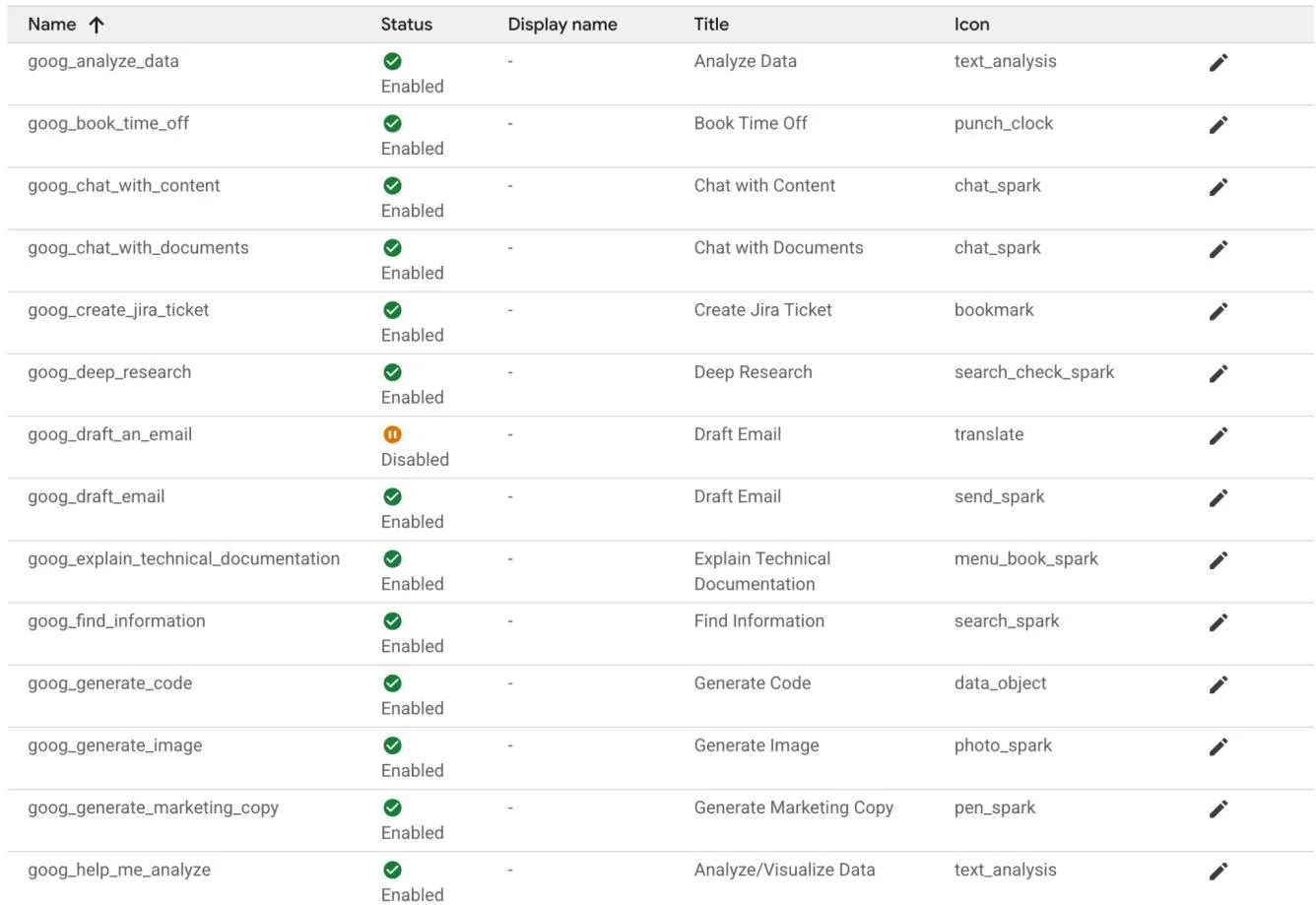
Fig.3: Google's Gallery of Pre-assembled prompts
In alternative you can create your own prompt as in Fig.4, which will be then used by your agent

Create prompt
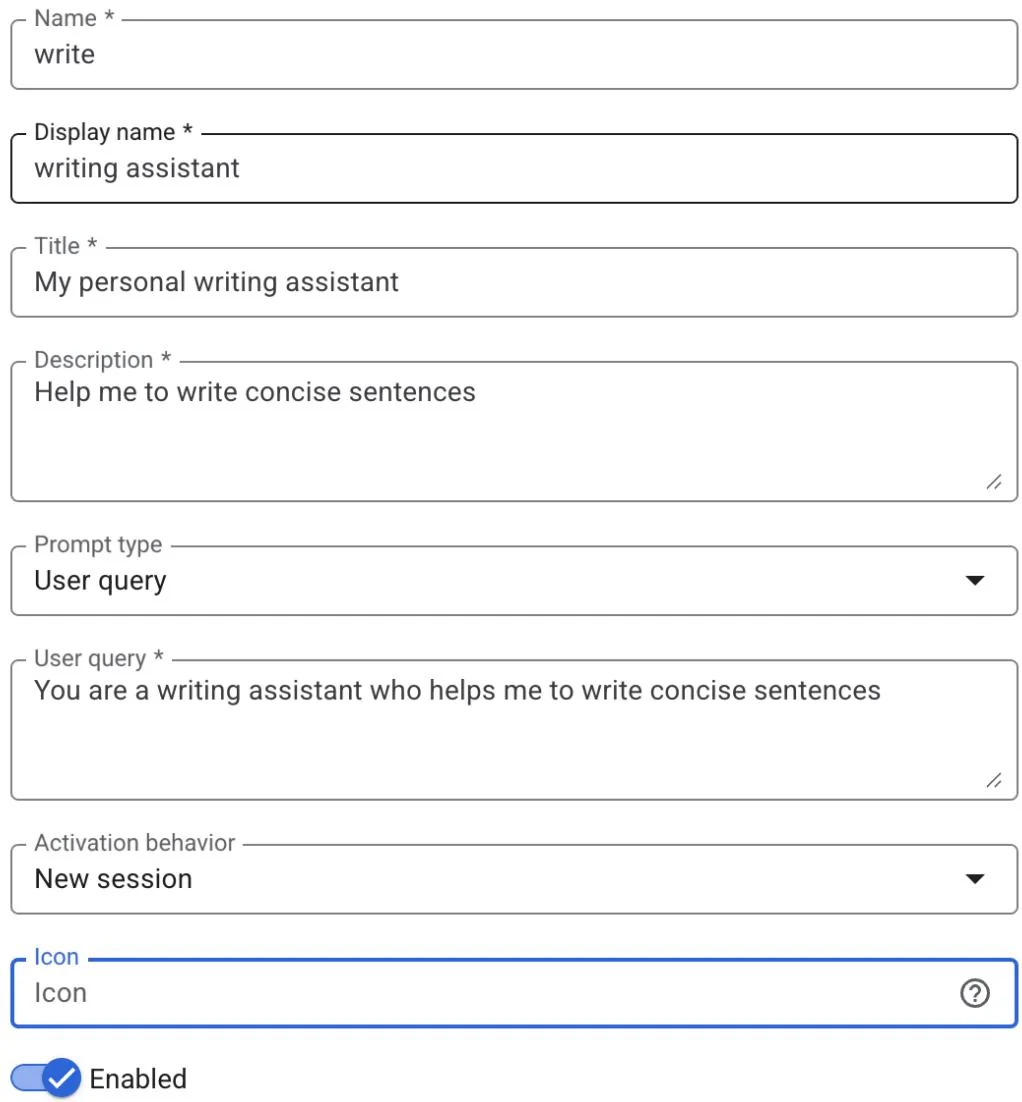
Fig.4: Customizing the Agent's Prompt
AgentSpace offers a number of advanced features such as integration with datastores to store your own data, integration with Google Knowledge Graph or with your private Knowledge Graph, Web interface for exposing your agent to the Web, and Analytics to monitor usage, and more (see Fig. 5)
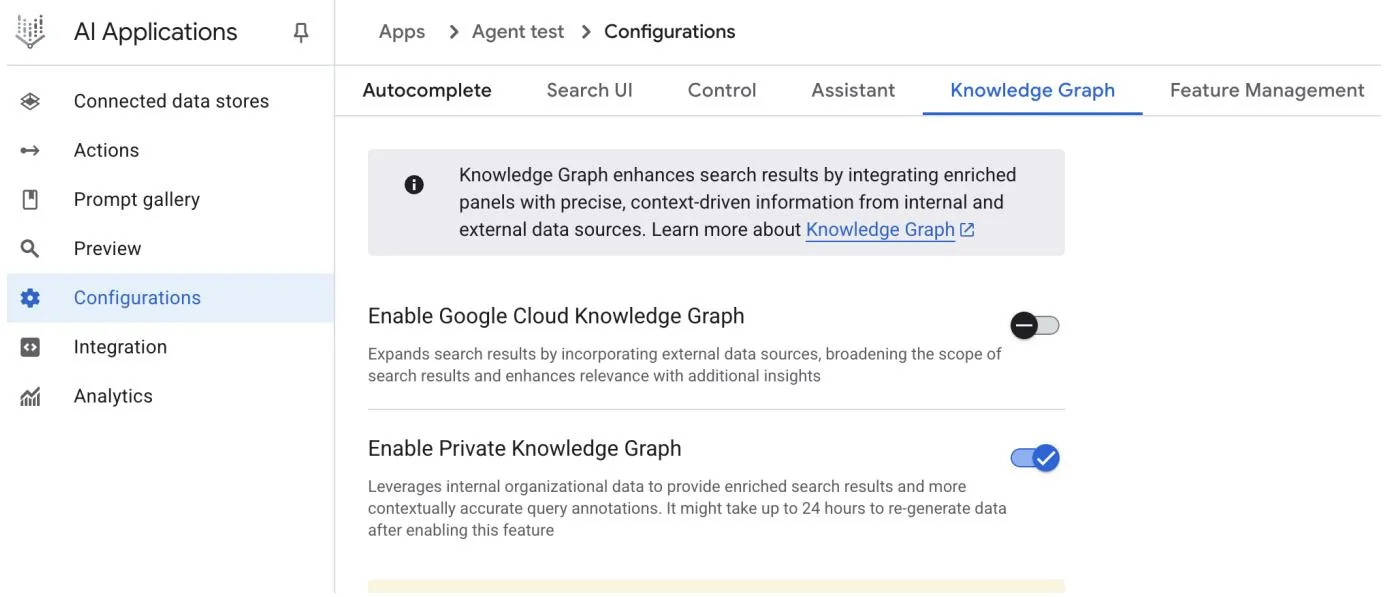
Fig. 5: AgentSpace advanced capabilities
Upon completion, the AgentSpace chat interface (Fig. 6) will be accessible.
Google Agentspace


Hello, student
Search your data and ask questions

Fig. 6: The AgentSpace User Interface for initiating a chat with your Agent.
Sources


Conclusion
In conclusion, AgentSpace provides a functional framework for developing and deploying AI agents within an organization's existing digital infrastructure. The system's architecture links complex backend processes, such as autonomous reasoning and enterprise knowledge graph mapping, to a graphical user interface for agent construction. Through this interface, users can configure agents by integrating various data services and defining their operational parameters via prompts, resulting in customized, context-aware automated systems.
This approach abstracts the underlying technical complexity, enabling the construction of specialized multi-agent systems without requiring deep programming expertise. The primary objective is to embed automated analytical and operational capabilities directly into workflows, thereby increasing process efficiency and enhancing data-driven analysis. For practical instruction, hands-on learning modules are available, such as the "Build a Gen AI Agent with Agentspace" lab on Google Cloud Skills Boost, which provides a structured environment for skill acquisition.
References
Create a no-code agent with Agent Designer,
https://cloud.google.com/agentspace/agentspace-enterprise/docs/agent-designer
Google Cloud Skills Boost, https://www.cloudskillsboost.google/
Appendix E - AI Agents on the CLI
Introduction
The developer's command line, long a bastion of precise, imperative commands, is undergoing a profound transformation. It is evolving from a simple shell into an intelligent, collaborative workspace powered by a new class of tools: AI Agent Command-Line Interfaces (CLIs). These agents move beyond merely executing commands; they understand natural language, maintain context about your entire codebase, and can perform complex, multi-step tasks that automate significant parts of the development lifecycle.
This guide provides an in-depth look at four leading players in this burgeoning field, exploring their unique strengths, ideal use cases, and distinct philosophies to help you determine which tool best fits your workflow. It is important to note that many of the example use cases provided for a specific tool can often be accomplished by the other agents as well. The key differentiator between these tools frequently lies in the quality, efficiency, and nuance of the results they are able to achieve for a given task. There are specific benchmarks designed to measure these capabilities, which will be discussed in the following sections.
Claude CLI (Claude Code)
Anthropic's Claude CLI is engineered as a high-level coding agent with a deep, holistic understanding of a project's architecture. Its core strength is its "agentic" nature, allowing it to create a mental model of your repository for complex, multi-step tasks. The interaction is highly conversational, resembling a pair programming session where it explains its plans before executing. This makes it ideal for professional developers working on large-scale projects involving significant refactoring or implementing features with broad architectural impacts.
Example Use Cases:
Large-Scale Refactoring: You can instruct it: "Our current user authentication relies on session cookies. Refactor the entire codebase to use stateless JWTs, updating the login/login endpoints, middleware, and frontend token handling." Claude will then read all relevant files and perform the coordinated changes.
API Integration: After being provided with an OpenAPI specification for a new weather service, you could say: "Integrate this new weather API. Create a service module to handle the API calls, add a new component to display the weather, and update the main dashboard to include it."
Documentation Generation: Pointing it to a complex module with poorly documented code, you can ask: "Analyze the ./src/util/data_PROCESSing.js file. Generate comprehensive TSDoc comments for every function, explaining its purpose, parameters, and return value."
Claude CLI functions as a specialized coding assistant, with inherent tools for core development tasks, including file ingestion, code structure analysis, and edit generation. Its deep integration with Git facilitates direct branch and commit management. The agent's extensibility is mediated by the Multi-tool Control Protocol (MCP), enabling users to define and integrate custom tools. This allows for interactions with private APIs, database queries, and execution of project-specific scripts. This architecture positions the developer as the arbiter of the agent's functional scope, effectively characterizing Claude as a reasoning engine augmented by user-defined tooling.
Gemini CLI
Google's Gemini CLI is a versatile, open-source AI agent designed for power and accessibility. It stands out with the advanced Gemini 2.5 Pro model, a massive context window, and multimodal capabilities (processing images and text). Its open-source nature, generous free tier, and "Reason and Act" loop make it a transparent, controllable, and excellent all-rounder for a broad audience, from hobbyists to enterprise developers, especially those within the Google Cloud ecosystem.
Example Use Cases:
Multimodal Development: You provide a screenshot of a web component from a design file (gemini describe component.png) and instruct it: "Write the HTML and CSS code to build a React component that looks exactly like this. Make sure it's responsive."
Cloud Resource Management: Using its built-in Google Cloud integration, you can command: "Find all GKE clusters in the production project that are running versions older than 1.28 and generate a gcloud command to upgrade them one by one."
Enterprise Tool Integration (via MCP): A developer provides Gemini with a custom tool called get-employee-details that connects to the company's internal HR API. The prompt is: "Draft a welcome document for our new hire. First, use
the get-employee-details --id=E90210 tool to fetch their name and team, and then populate the welcome_template.md with that information."
Large-Scale Refactoring: A developer needs to refactor a large Java codebase to replace a deprecated logging library with a new, structured logging framework. They can use Gemini with a prompt like: Read all *.java files in the 'src/main/java' directory. For each file, replace all instances of the 'org.apache.log4j' import and its 'Logger' class with 'org.slf4j Logging' and 'LoggingFactory'. Rewrite the logger instantiation and all .info(), .debug(), and .error() calls to use the new structured format with key-value pairs.
Gemini CLI is equipped with a suite of built-in tools that allow it to interact with its environment. These include tools for file system operations (like reading and writing), a shell tool for running commands, and tools for accessing the internet via web fetching and searching. For broader context, it uses specialized tools to read multiple files at once and a memory tool to save information for later sessions. This functionality is built on a secure foundation: sandboxing isolates the model's actions to prevent risk, while MCP servers act as a bridge, enabling Gemini to safely connect to your local environment or other APIs.
Aider
Aider is an open-source AI coding assistant that acts as a true pair programmer by working directly on your files and committing changes to Git. Its defining feature is its directness; it applies edits, runs tests to validate them, and automatically commits every successful change. Being model-agnostic, it gives users complete control over cost and capabilities. Its git-centric workflow makes it perfect for developers who value efficiency, control, and a transparent, auditable trail of all code modifications.
Example Use Cases:
Test-Driven Development (TDD): A developer can say: "Create a failing test for a function that calculates the factorial of a number." After Aider writes the test and it fails, the next prompt is: "Now, write the code to make the test pass." Aider implements the function and runs the test again to confirm.
Precise Bug Squashing: Given a bug report, you can instruct Aider: "The calculate_total function in billing.py fails on leap years. Add the file to the context, fix the bug, and verify your fix against the existing test suite."
Dependency Updates: You could instruct it: "Our project uses an outdated version of the 'requests' library. Please go through all Python files, update the import statements and any deprecated function calls to be compatible with the latest version, and then update requirements.txt."
GitHub Copilot CLI
GitHub Copilot CLI extends the popular AI pair programmer into the terminal, with its primary advantage being its native, deep integration with the GitHub ecosystem. It understands the context of a project within GitHub. Its agent capabilities allow it to be assigned a GitHub issue, work on a fix, and submit a pull request for human review.
Example Use Cases:
Automated Issue Resolution: A manager assigns a bug ticket (e.g., "Issue #123: Fix off-by-one error in pagination") to the Copilot agent. The agent then checks out a new branch, writes the code, and submits a pull request referencing the issue, all without manual developer intervention.
Repository-Aware Q&A: A new developer on the team can ask: "Where in this repository is the database connection logic defined, and what environment variables does it require?" Copilot CLI uses its awareness of the entire repo to provide a precise answer with file paths.
Shell Command Helper: When unsure about a complex shell command, a user can ask: gh? find all files larger than 50MB, compress them, and place them in an archive folder. Copilot will generate the exact shell command needed to perform the task.
Terminal-Bench: A Benchmark for AI Agents in Command-Line Interfaces
Terminal-Bench is a novel evaluation framework designed to assess the proficiency of AI agents in executing complex tasks within a command-line interface. The terminal is identified as an optimal environment for AI agent operation due to its text-based, sandboxed nature. The initial release, Terminal-Bench-Core-v0, comprises 80 manually curated tasks spanning domains such as scientific workflows and data analysis. To ensure equitable comparisons, Terminus, a minimalistic agent, was developed to serve as a standardized testbed for various language models. The framework is designed for extensibility, allowing for the integration of diverse agents through containerization or direct connections. Future developments include enabling massively parallel evaluations and incorporating established benchmarks. The project encourages open-source contributions for task expansion and collaborative framework enhancement.
Conclusion
The emergence of these powerful AI command-line agents marks a fundamental shift in software development, transforming the terminal into a dynamic and collaborative environment. As we've seen, there is no single "best" tool; instead, a vibrant ecosystem is forming where each agent offers a specialized strength. The ideal choice depends entirely on the developer's needs: Claude for complex architectural tasks, Gemini for versatile and multimodal problem-solving, Aider for git-centric and direct code editing, and GitHub Copilot for seamless integration into the GitHub workflow. As these tools continue to evolve, proficiency in leveraging them will become an essential skill, fundamentally changing how developers build, debug, and manage software.
References
Anthropic. Claude. https://docs.anthropic.com/en/docs/claude-code/cgi-reference
Google Gemini Cli https://github.com/google-gemini/gemini-cli
Aider. https://aider chat/
GitHub Copilot CLI https://docs.github.com/en/copilot/github-copilot-enterprise/copilot-cli
Terminal Bench: https://www.tbench.ai/