4.5_Amazon_Web_Services
4.5 Amazon Web Services
Amazon Web Services is the preeminent vendor of "infrastructure as a service" (IAAS) cloud computing services. Their Web services enable customers to allocate storage, transfer data to and from their data centers, and run servers in their data centers. In turn, customers are charged for the privilege on an a la carte basis: per byte of storage, per byte transferred, or per instance-hour of server time. On the one hand, customers can access potentially unlimited compute resources without having to invest in their own infrastructure, and on the other hand, they need only pay for the resources they use. Due to the flexibility and the cloud's ability to accommodate rapidly increasing demand (say, if an independent game developer's game "goes viral"), cloud computing is rapidly increasing in popularity.
A full description of the features of AWS and how to use them is outside the scope of this book. Here we cover some salient features for those who are interested in test-driving CUDA-capable virtual machines.
S3 (Simple Storage Service) objects can be uploaded and downloaded.
EC2 (Elastic Compute Cloud) instances can be launched, rebooted, and terminated.
EBS (Elastic Block Storage) volumes can be created, copied, attached to EC2 instances, and destroyed.
It features security groups, which are analogous to firewalls for EC2 instances.
It features key pairs, which are used for authentication.
All of the functionality of Amazon Web Services is accessible via the AWS Management Console, accessible via aws.amazon.com. The AWS Management Console can do many tasks not listed above, but the preceding handful of operations are all we'll need in this book.
4.5.1 COMMAND-LINE TOOLS
The AWS command-line tools can be downloaded from http://aws.amazon.com/developertools. Look for "Amazon EC2 API Tools." These tools can be used out of the box on Linux machines; Windows users can install Cygwin. Once installed, you can use commands such as ec2-run-instances to launch EC2 instances, ec2-describe-instances to give a list of running instances, or ec2-terminate-instances to terminate a list of instances. Anything that can be done in the Management Console also can be done using a command-line tool.
4.5.2 EC2 AND VIRTUALIZATION
EC2, the "Elastic Compute Cloud," is the member of the AWS family that enables customers to "rent" a CUDA-capable server for a period of time and be charged only for the time the server was in use. These virtual computers, which look to the customer like standalone servers, are called instances. Customers can use EC2's Web services to launch, reboot, and terminate instances according to their need for the instances' computing resources.
One of the enabling technologies for EC2 is virtualization, which enables a single server to host multiple "guest" operating systems concurrently. A single server in the EC2 fleet potentially can host several customers' running instances, improving the economies of scale and driving down costs. Different instance types have different characteristics and pricing. They may have different amounts of RAM, CPU power, local storage, and I/O performance, and the on-demand pricing may range from 2.40 per instance-hour. As of this writing, the CUDA-capable cg1.4xlarge instance type costs $2.10 per instance-hour and has the following characteristics.
23 GB of RAM
33.5 ECUs (two quad-core Intel Xeon X5570 "Nehalem" CPUs)
1690 GB of instance storage
64-bit platform
Since cg1.4xlarge is a member of the "cluster" instance family, only a single instance will run on a given server; also, it is plugged into a much higher bandwidth network than other EC2 instance types to enable cluster computing for parallel workloads.
4.5.3 KEY PAIRS
Access to EC2 instances is facilitated by key pairs. The term refers to the central concept in public key cryptography that the authentication is performed using a private key (available only to those who are authorized) and a public key that can be freely shared.
When a key pair is created, the private key is downloaded in the form of a . pem file. There are two reasons to keep careful track of a . pem file after creating a key pair: First, anyone with access to the . pem file can use it to gain access to your EC2 computing resources, and second, there is no way to obtain new copies of the private key! Amazon is not in the key retention business, so once the private key is downloaded, it is yours to keep track of.
Listing 4.1 gives an example . pem file. The format is convenient because it has anchor lines (the "BEGIN RSA PRIVATE KEY"/ "END RSA PRIVATE KEY") and is "7-bit clean" (i.e., only uses ASCII text characters), so it can be emailed, copied-and-pasted into text fields, appended to files such as ~/. ssh/ authorized_keys to enable password-less login, or published in books. The name for a given key pair is specified when launching an EC2 instance; in turn, the corresponding private key file is used to gain access to that instance. To see more specifically how the . pem file is used to access EC2 instances, see the sections on Linux and Windows below.
Listing 4.1 Example . pem file.
----BEGIN RSA PRIVATE KEY-----
MIIEowIBAOKCAQEA2mHaXk9tTZqN7ZiUWoxhcSHjVCbHmn1SKamXqOKdLDfmqducvVkAlB1cjIz/
NcwIHk0TxbnEPEDyPPHg8RYGya34evswzBUCOIcilbVIpVCyaTyzo4k0WKPW8znXJzQpxr/OHzzu
tAv1q95HGoBobuGM5kaDSLkugOmTUXFKxZ4ZN1rm2kuo21N2m9jrddDDq4qTMFxuYW0HXeHOFNF ImroUCN2udTWOjpdgIPCgYEzz3Cssd9QIZdyadw+wbkTYq7eeqTNKULs4/gmLIAw+EXKE2/seyBL 1eQeK11jTFhDCjYRfghp0ecv4UnpAtiO6nZod7aTAR1bXqJXbSqWIDAQABAoIBAAh2umv1UCst zkpjG3zW6//ifFkKl7nZGZIbzJDzF3xbPklfBZghFvCmoquf21ROcBIckqObK4vaSIksJrexTtoK MBM0IRQHzGo8co6y0/n0QrXpcFzqOGknEHGk0D3ou6XEUUzMo80+okwi9UaFq4aAn2FdYkFDA5X7 d4Y0id1WzPcvVurOSrnFNkWl4GRu+pluD2bmSmb7RUxQWGbP7bf98EyhpduOd07R3yOCcdaaGgOL hdTlWJ3jCP9dmkN7QApRzkv7R1sXzOnU2v3b9+WpF0g6wCeM2eUuK1IY3BP10Pg+Q4xU0jpRSr0 vLdTfUcIdH4PXTKua1NxBA1uCgYEA72wC3BmL7HMIgf33yyK+/yA1z6AsAvIIALCHJOi9siht XF6dnfaJ6d12oCj1RUqG9e9Y3cw1YjgcdqQBk5F8M6bPuIfzOctM/urd1ryWZ3ddSxgBaLEO1h4c 3/cQWGGVaMPpDSAih2d/CnnlVoQGiRqlWxDGzIHzu8RRV43fKcCgYE6YDkj6kz1x4cuQwwsPVb IfdtP6WrHe+Ro724ka3Ry+4xFPCarXj5yl15/aPNHDPPCfR+uYNjBiTD90w+duV8LtBxJoF+i/1t Mui4116xXMBaMGQfFMS0u2+z3aZI8MXZF8gGDIri9VVfpDCi2RNKaT7KhfraZ8VzZsdAqDO8Z10C gYEAvVq3iEvMF12ERQsPhzslQ7G93U/YfxcVqcbfo2qOJIRTcPduZ90gjCWmw/E/fZmxT6ELs31grBz HBM0r8BWXteZW2B6uH8NJpBbOfUFQhk0+u+0uUeDFcGy8jUusRM9ojigCOntfHMXMESSfT6a2yn f4VL0wmkqUWQV2FMT4iMadECgYATFUGYra9XTlKynNht3d9wyzPwe8ecTrPswdj3rujybaj90aSo gLaJX2eyP/C6mLDW83BX4PD6045ga46/UMnxWX+10fdxoRTXkEVq9IYyO1Yklkoj/F944gwfFS3o 34J6exJjfAQAoK3EUWU9sGHocAVFJdcrm+tufuI93NyMQKBgB+koBIjkJG8u0f19ow1dhUWERsuo poXZ9Kh/GvjJ9u5DUwv6F+hCGRotdBHjuwKNtbutdzElxDMNHKoy/rhiygcnEMUmyH/H04sOW1 XqqMD2QfKXBAU0ttviPbsmm0dbjzTTd3FO1qx2K90T3u9GEUDWqXjUoLyNr+Tar ----END RSA PRIVATE KEY--------
4.5.4 AVAILABILITY ZONES (AZS) AND REGIONS
AWS provides its services in separate Availability Zones (AZs) that are carefully segregated from one another, with the intention of preventing outages affecting one Availability Zone from affecting any other Availability Zone. For CUDA developers, the main consideration to bear in mind is that instances, EBS volumes, and other resources must be in the same AZ to interoperate.
4.5.5 S3
S3 (Simple Storage Service) is designed to be a reliable way to store data for later retrieval. The "objects" (basically files) are stored in a hierarchical layout consisting of "buckets" at the top of the hierarchy, with optional intervening " folders."
Besides storage and retrieval ("PUT" and "GET," respectively), S3 includes the following features.
Permissions control. By default, S3 objects are accessible only to the owner of the S3 account, but they may be made public or permissions can be granted to specific AWS accounts.
Objects may be encrypted.
Metadata may be associated with an S3 object, such as the language of a text file or whether the object is an image.
Logging: Operations performed on S3 objects can be logged (and the logs are stored as more S3 objects).
Reduced Redundancy: S3 objects can be stored with a lower reliability factor, for a lower price.
Notifications: Automatic notifications can be set up, to, for example, let the customer know if loss of a Reduced Redundancy object is detected.
Object lifetime management: Objects can be scheduled to be deleted automatically after a specified period of time.
Many other AWS services use S3 as a persistent data store; for example, snapshots of AMIs and EBS volumes are stored in S3.
4.5.6 EBS
EBS (Elastic Block Storage) consists of network-based storage that can be allocated and attached and detached to running instances. AWS customers also can "snapshot" EBS volumes, creating templates for new EBS volumes.
EC2 instances often have a root EBS volume that contains the operating system and driver software. If more storage is desired, you can create and attach an EBS volume and mount it within the guest operating system.2
4.5.7 AMIS
Amazon Machine Images (AMIs) are descriptions of what an EC2 instance would "look like" once launched, including the operating system and the number and contents of attached EBS volumes. Most EC2 customers start with a "stock" AMI provided by Amazon, modify it to their satisfaction, and then take a snapshot of the AMI so they can launch more instances with the same setup.
When an instance is launched, EC2 will take a few minutes to muster the requested resources and boot the virtual machine. Once the instance is running,
you can query its IP address and access it over the Internet using the private key whose name was specified at instance launch time.
The external IP address of the instance is incorporated into the DNS name. For example, a cg1.4xlarge instance might be named
ec2-70-17-16-35.compute-1.amazon.com
and the external IP address of that machine is 70.17.16.35.3
EC2 instances also have internal IP addresses that can be used for intracluster communication. If, for example, you launch a cluster of instances that need to communicate using software such as the Message Passing Interface (MPI), use the internal IP addresses.
4.5.8 LINUX ON EC2
EC2 supports many different flavors of Linux, including an Amazon-branded flavor ("Amazon Linux") that is derived from Red Hat. Once an instance is launched, it may be accessed via ssh using the key pair that was used to launch the instance. Using the IP address above and the Example .perm file in Listing 4.1, we might type
ssh -i Example.pem ec2-user@70.17.16.35
(The root username varies with the flavor of Linux: ec2-user is the root username for Amazon Linux, while CentOS uses root and Ubuntu uses ubuntu.)
Once logged in, the machine is all yours! You can add users and set their passwords, set up SSH for password-less login, install needed software (such as the CUDA toolchain), attach more EBS volumes, and set up the ephemeral disks. You can then snapshot an AMI to be able to launch more instances that look exactly like the one you've set up.
EBS
EBS (Elastic Block Storage) volumes are easy to create, either from a blank volume or by making a live copy of a snapshot. Once created, the EBS volume may be attached to an instance, where it will appear as a device (such as /dev/sdf or, on more recent Linux kernels, /dev/xvdf). When the EBS volume is first attached, it is just a raw block storage device that must be formatted before
use using a command such as mkfs.ext3. Once formatted, the drive may be mounted to a directory.
mount
Finally, if you want to snapshot an AMI and for the drive to be visible on instances launched using the derivative AMI, edit /etc/fstab to include the volume. When creating an EBS volume to attach to a running instance, make sure to create it in the same Availability Zone (e.g., us-east-1b) as the instance.
Ephemeral Storage
Many EC2 instance types, including cg1.4xlarge, have local hard disks associated with them. These disks, when available, are used strictly for scratch local storage; unlike EBS or S3, no erasure encoding or other technologies are employed to make the disks appear more reliable. To emphasize this reduced reliability, the disks are referred to as ephemeral storage.
To make ephemeral disks available, specify the "-b" option to ec2-run-instances—for example,
ec2-run-instances -t cg1.4xlarge -k nwiltEC2 -b /dev/sdb=ephemeral0 /dev/sdc=ephemeral1
Like EBS volumes, ephemerals must be formatted (e.g., mkfs.ext3) and mounted before they can be used, and they must have fstab entries in order to reappear when the instance is rebooted.
User Data
User data may be specified to an instance, either at launch time or while an instance is running (in which case the instance must be rebooted). The user data then may be queried at
http://169.254.169.254/latest/user-data
4.5.9 WINDOWS ON EC2
Windows instances are accessed in a slightly different way than Linux instances. Once launched, customers must use their private key file to retrieve the password for the EC2 instance's Administrator account. You can either specify your . pem file or copy-and-paste its contents into the AWS Management Console (shown in Figure 4.1).
Retrieve Default Windows Administrator Password
Cancel

To access this instance remotely (e.g., Remote Desktop Connection), you will need your Windows Administrator password. A default password was created when the instance was launched and is available encrypted in the system log.
To decrypt your password, you will need your key pair for this instance. Browse to your key pair, or copy & paste the contents of your private key file into the text box below, then click Decrypt Password.

Figure 4.1 AWS Windows password retrieval.
Instance: i-4b1fc82e
Required field
Encrypted
Password:
ZT+dtekyyDMS5YNcEcBBTTqw8C45yUT9...
Key Pair: nwiltEC2.pem
Note: You were prompted to download and save this when you created your key pair.
Private Key*:
Browse
Decrypt Password
By default, this password-generation behavior is only in force on "stock" AMIs from AWS. If you "snapshot" one of these AMIs, they will retain whatever passwords were present on the machine when the snapshot was taken. To create a new Windows AMI that generates a random password upon launch, run the "EC2 Config Service" tool (available in the Start menu), click the "Bundle" tab, and click the button that says "Run Sysprep and Shutdown Now" (Figure 4.2). After clicking this button, any AMI created against it will generate a random password, like the stock Windows AMIs.
Ephemeral Storage
In order for ephemeral storage to be useable by a Windows instance, you must specify the -b option to ec2-run- instances, as follows.
ec2-run-instances -t cgl.4xlarge -k nwiltEC2 -b /dev/sdb=ephemeral0 /dev/sdc=ephemeral1
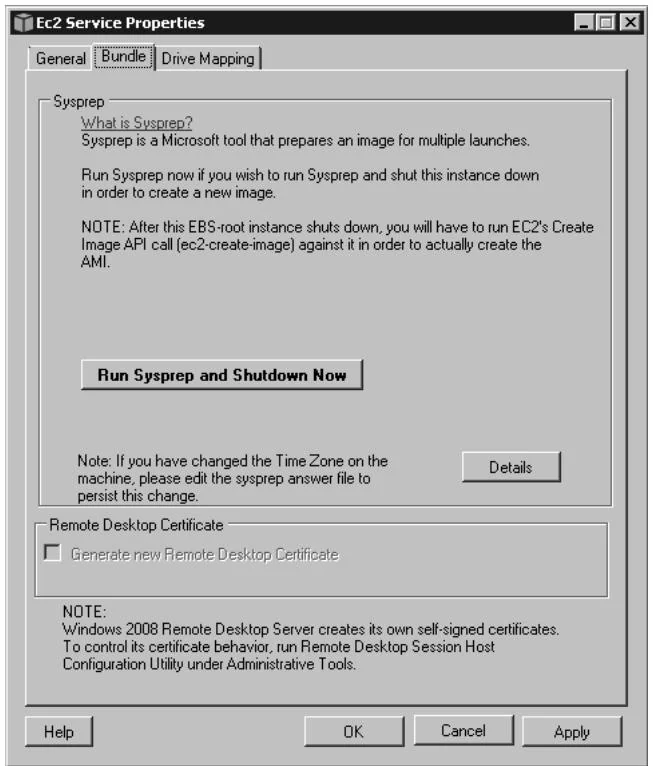
Figure 4.2 Sysprep for Windows on EC2.
User Data
User data may be specified to an instance, either at launch time or while an instance is running (in which case the instance must be rebooted). The user data then may be queried at
http://169.254.169.254/latest/user-data
This page intentionally left blank
PART II
This page intentionally left blank
Memory
To maximize performance, CUDA uses different types of memory, depending on the expected usage. Host memory refers to the memory attached to the CPU(s) in the system. CUDA provides APIs that enable faster access to host memory by page-locking and mapping it for the GPU(s). Device memory is attached to the GPU and accessed by a dedicated memory controller, and, as every beginning CUDA developer knows, data must be copied explicitly between host and device memory in order to be processed by the GPU.
Device memory can be allocated and accessed in a variety of ways.
Global memory may be allocated statically or dynamically and accessed via pointers in CUDA kernels, which translate to global load/store instructions.
Constant memory is read-only memory accessed via different instructions that cause the read requests to be serviced by a cache hierarchy optimized for broadcast to multiple threads.
Local memory contains the stack: local variables that cannot be held in registers, parameters, and return addresses for subroutines.
Texture memory (in the form of CUDA arrays) is accessed via texture and surface load/store instructions. Like constant memory, read requests from texture memory are serviced by a separate cache that is optimized for readily access.
Shared memory is an important type of memory in CUDA that is not backed by device memory. Instead, it is an abstraction for an on-chip "scratchpad" memory that can be used for fast data interchange between threads within a block. Physically, shared memory comes in the form of built-in memory on the SM: On
SM 1.x hardware, shared memory is implemented with a 16K RAM; on SM 2.x and more recent hardware, shared memory is implemented using a 64K cache that may be partitioned as 48K L1/16K shared, or 48K shared/16K L1.