2.3_Multiple_GPUs
2.3 Multiple GPUs
This section explores the different ways that multiple GPUs can be installed in a system and the implications for CUDA developers. For purposes of this discussion, we will omit GPU memory from our diagrams. Each GPU is assumed to be connected to its own dedicated memory.
Around 2004, NVIDIA introduced "SLI" (Scalable Link Interface) technology that enables multiple GPUs to deliver higher graphics performance by working in parallel. With motherboards that could accommodate multiple GPU boards, end users could nearly double their graphics performance by installing two GPUs in their system (Figure 2.10). By default, the NVIDIA driver software configures these boards to behave as if they were a single, very fast GPU to accelerate graphics APIs such as DirectX and OpenGL. End users who intend to use CUDA must explicitly enable it in the Display Control panel on Windows.
It also is possible to build GPU boards that hold multiple GPUs (Figure 2.11). Examples of such boards include the GeForce 9800GX2 (dual-G92), the GeForce GTX 295 (dual-GT200), the GeForce GTX 590 (dual-GF110), and
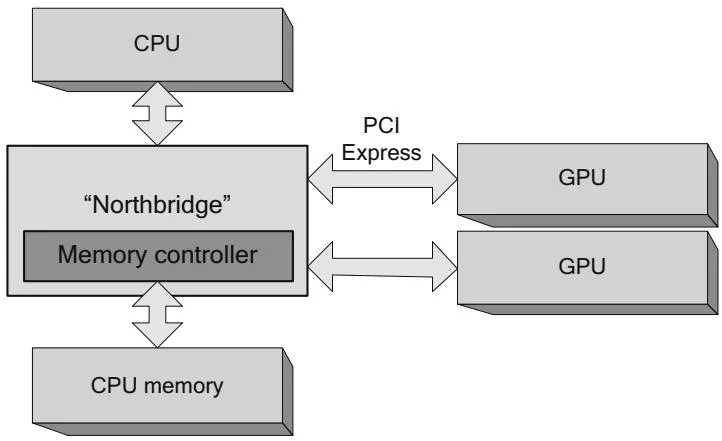
Figure 2.10 GPUs in multiple slots.
the GeForce GTX 690 (dual-GK104). The only thing shared by the GPUs on these boards is a bridge chip that enables both chips to communicate via PCI Express. They do not share memory resources; each GPU has an integrated memory controller that gives full-bandwidth performance to the memory connected to that GPU. The GPUs on the board can communicate via peer-to-peer memcpy, which will use the bridge chip to bypass the main PCIe fabric. In addition, if they are Fermi-class or later GPUs, each GPU can map memory belonging to the other GPU into its global address space.
SLI is an NVIDIA technology that makes multiple GPUs (usually on the same board, as in Figure 2.11) appear as a single, much faster GPU. When the graphics

Figure 2.11 Multi-GPU board.
application downloads textures or other data, the NVIDIA graphics driver broadcasts the data to both GPUs; most rendering commands also are broadcast, with small changes to enable each GPU to render its part of the output buffer. Since SLI causes the multiple GPUs to appear as a single GPU, and since CUDA applications cannot be transparently accelerated like graphics applications, CUDA developers generally should disable SLI.
This board design oversubscribes the PCI Express bandwidth available to the GPUs. Since only one PCI Express slot's worth of bandwidth is available to both GPUs on the board, the performance of transfer-limited workloads can suffer. If multiple PCI Express slots are available, an end user can install multiple dual-GPU boards. Figure 2.12 shows a machine with four GPUs.
If there are multiple PCI Express I/O hubs, as with the system in Figure 2.6, the placement and thread affinity considerations for NUMA systems apply to the boards just as they would to single-GPU boards plugged into that configuration.
If the chipset, motherboard, operating system, and driver software can support it, even more GPUs can be crammed into the system. Researchers at the University of Antwerp caused a stir when they built an 8-GPU system called FASTRA by plugging four GeForce 9800GX2's into a single desktop computer. A similar system built on a dual-PCI Express chipset would look like the one in Figure 2.13.
As a side note, peer-to-peer memory access (the mapping of other GPUs' device memory, not memcpy) does not work across I/O hubs or, in the case of CPUs such as Sandy Bridge that integrate PCI Express, sockets.

Figure 2.12 Multi-GPU boards in multiple slots.
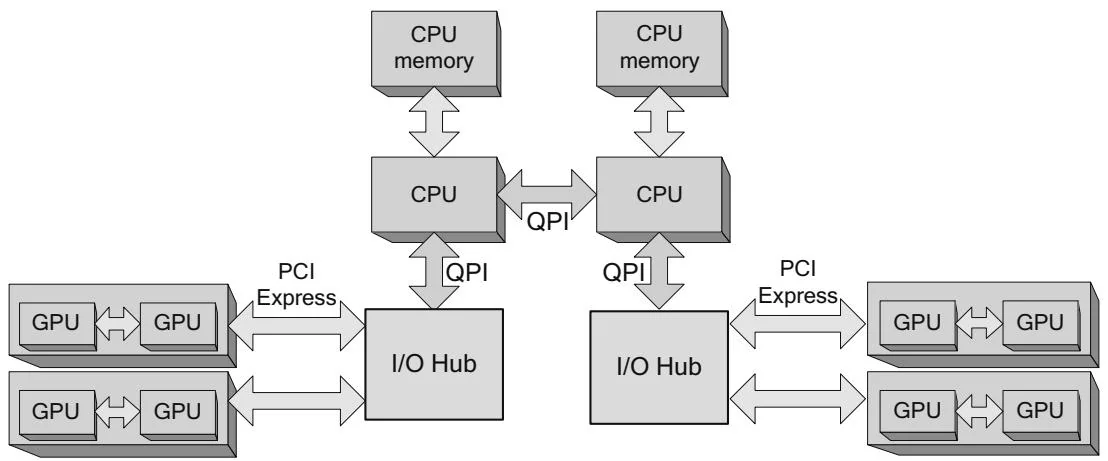
Figure 2.13 Multi-GPU boards, multiple I/O hubs.