15.1_Overview
15.1 Overview
Two 2D images, the image and the template, are compared by computing a correlation coefficient as follows.
where and are the image and template, respectively; is the average value of the template; and is the average value of the image pixels corresponding to the template.
The value of this coefficient falls into the range ; a value of 1.0 corresponds to a perfect match. An optimized implementation of normalized correlation factors out the statistics that may be precomputed and computes sums instead of averages to avoid a separate pass over the input data. If pixels are being compared, replacing with and multiplying the numerator and denominator by yields a coefficient that can be expressed entirely in terms of sums. Rewriting without the coordinate notation:
Assuming the template will be the same for many correlation computations, the statistics on the template and can be precomputed, as can the subexpression in the denominator. Translating this notation to C variable names gives the following.
Then a normalized correlation value may be computed using this function.
float CorrelationValue(float SumI, float SumISq, float SumT, float SumTSq, float SumIT, float N) { float Numerator = N*SumIT - SumI*SumT; float Denominator = (N*SumISq - SumI*SumI)* (N*SumTSq - SumT*SumT); return Numerator / sqrtf(Denominator); }In practical applications for this algorithm, the template is kept fixed across many invocations, matching against different offsets into an image. Then it makes sense to precompute the template statistics and the denominator subexpression
float fDenomExp = N*SumSqT - SumT*SumT;In practice, it's best to use double precision to compute fDenomExp.
float fDenomExp = (float) ((double) N*SumSqT - (double) SumT*SumT);Note: This computation is done on the CPU, once per template.
It is faster to multiply by the reciprocal square root than to divide by the square root, which results in the following CorrelationValue() function.
float
CorrelationValue(float SumI,float SumISq,float SumIT, float N,float fDenomExp)
{ float Numerator  $=$  cPixels\*SumIT-  $\mathrm{SumI}^{*}\mathrm{SumT};$  float Denominator  $=$  fDenomExp\*(cPixels\*SumISq-  $\mathrm{SumI}^{*}\mathrm{SumI})$  return Numerator \*rsqrtf(Denominator);
1
Hence, an optimized implementation of this algorithm need only compute three sums over the pixels to compute a given correlation coefficient: , , and . Since the SMs include hardware support for integer multiply-add, NVIDIA GPUs are able to perform this computation extremely fast.
CUDA offers a number of paths that could be used to deliver the data to the streaming multiprocessors.
Global memory or texture memory for the image, the template, or both
Constant memory for the template and possibly other template-specific parameters (up to 64K)
Shared memory to hold image and/or template values for reuse
This chapter assumes the pixels are 8-bit grayscale. The hardware works very well on images with higher precision, but if anything, that simplifies the problem by making it easier to efficiently address global and shared memory.
All of the CUDA implementations in this chapter use texture for the image that is being compared with the template. There are several reasons for this.
The texture units deal with boundary conditions gracefully and efficiently.
The texture cache aggregates external bandwidth on reuse, which will occur as nearby correlation values are computed.
The 2D locality of the texture cache is a good fit with the access patterns exhibited by correlation search algorithms.
We'll explore the tradeoffs of using texture versus constant memory for the template.
15.2 Naïve Texture-Texture Implementation
Our first implementation of normalized cross-correlation uses the texture unit to read both image and template values. This implementation is not optimized; it does not even include the optimization to precompute the template statistics. But it is simple to understand and will serve as a good basis for more highly optimized (but more byzantine) implementations.
Listing 15.1 gives the kernel that performs this computation. It computes the five sums, then uses the CorrelationValue() utility function given earlier to write the float-valued correlation coefficients into the output array. Note that the expression computing fDenomExp will issue a warning on pre-SM 1.3 architectures, which do not include double precision support. The kernel will still work as long as the number of pixels in the template is not too large.
The upper left corner of the image is given by (xUL, yUL); the width and height of the search window, and thus the output array of coefficients, is given by w and h. If the template is in a texture, the upper left corner of the template in the texture image is given by (xTemplate, yTemplate).
Finally, an offset (xOffset, yOffset) specifies how the template will be overlaid with the image for comparison purposes. When fetching image pixels,
this offset is added to the coordinates of the search rectangle whose upper left corner is (xUL, yUL).
It's instructive to look at how the correlation function "falls off" in the neighborhood of the image from which a template is extracted. The sample program normalizedCrossCorrelation.cu writes out the neighborhood around the template:
Neighborhood around template:
In the coins image included in the book, the default template is a 52x52 subimage around the dime in the lower right corner (Figure 15.1). The default program optionally can write a PGM file as output, with the correlation values converted to pixel values in the range 0..255. For the template highlighted in Figure 15.1, the resulting image is given in Figure 15.2. The other dimes are very bright, with strong matches, while the other coins get less intense responses.
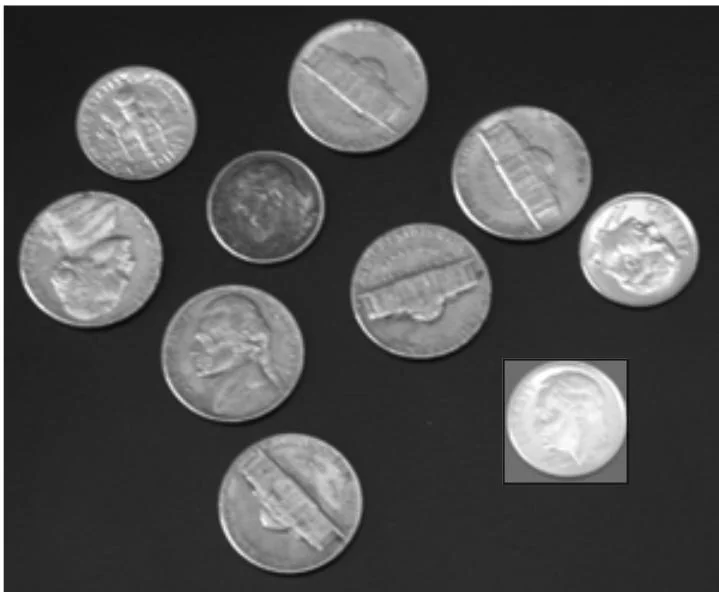
Figure 15.1 Coins.pgm (with default template highlighted).
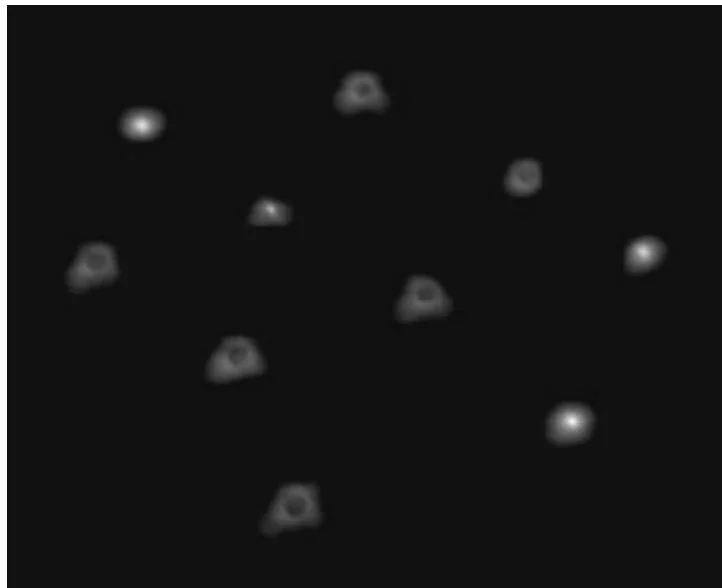
Figure 15.2 Correlation image with default template.
Listing 15.1 corrTexTex2D_kernel.
__global__ void
corrTexTex2D_kernel()
float *pCorr, size_t CorrPitch, float cPixels, int xOffset, int yOffset, int xTemplate, int yTemplate, int wTemplate, int hTemplate, float xUL, float yUL, int w, int h)
{
    size_t row = BlockIdx.y*blockDim.y + threadIdx.y;
    size_t col = BlockIdx.x*blockDim.x + threadIdx.x;
    // adjust pCorr to point to row
    pCorr = (float *) ((char *) pCorr+row*CorrPitch);
    // No __syncthreads in this kernel, so we can early-out
    // without worrying about the effects of divergence.
    if (col >= w || row >= h)
        return;
    int SumI = 0;
    int SumT = 0;
    int SumISq = 0;
    int SumTSq = 0;
int SumIT = 0;
for ( int y = 0; y < hTemplate; y++) { for ( int x = 0; x < wTemplate; x++) { unsigned char I = tex2D( texImage, (float) col+xUL+xOffset+x, (float) row+yUL+yOffset+y); unsigned char T = tex2D( texTemplate, (float) xTemplate+x, (float) yTemplate+y); SumI += I; SumT += T; SumISq += I*I; SumTSq += T*T; SumIT += I*T; } float fDenomExp = (float) (double) cPixels*SumTSq - (double) SumT*SumT); pCorr [col] = CorrelationValue( SumI, SumISq, SumIT, SumT, cPixels, fDenomExp ); }Listing 15.2 gives the host code to invoke corrTexTex2D_kernel(). It is designed to work with the testing and performance measurement code in the sample source file normalizedCrossCorrelation.cu, which is why it has so many parameters. This host function just turns around and launches the kernel with the needed parameters, but later implementations of this function will check the device properties and launch different kernels, depending on what it finds. For images of a useful size, the cost of doing such checks is negligible compared to the GPU runtime.
Listing 15.2 corrTexTex2D() (host code).
void
corrTexTex2D( float \*dCorr, int CorrPitch, int wTile, int wTemplate, int hTemplate, float cPixels, float fDenomExp, int sharedPitch, int xOffset, int yOffset, int xTemplate, int yTemplate, int xUL, int yUL, int w, int h, dim3 threads, dim3 blocks, int sharedMem)
{ corrTexTex2D_kernel<<blocks, threads>>>(dCorr, CorrPitch, cPixels, xOffset, yOffset,
xTemplate + xOffset, yTemplate + yOffset, wTemplate, hTemplate, (float) xUL, (float) yUL, w, h);A texture-texture formulation is a very good fit if the application is choosing different templates as well as different images during its search—for example, applying transformations to the template data while comparing to the image. But for most applications, the template is chosen once and compared against many different offsets within the image. The remainder of the chapter will examine implementations that are optimized for that case.